KeePassDX Password Manager APK Download v for Android
| Updated | October 2026 |
| Size | 17 MB |
| Version | 4.5.5 |
| Requirements | Android 4.4 and up |
| Downloads | 500K+ |
| Get it on |  |
Description
If you are looking for a keepassdx apk download that keeps every password in your pocket — encrypted, offline, and entirely under your control — you have come to the right page. KeePassDX is a free and open-source password manager for Android. It is built around the trusted KeePass database format. As a result, all your logins live in a single encrypted file on your own device. You can unlock it with a master password or your fingerprint. Moreover, there is no account, no cloud, and no subscription required.
Most password managers today want you to store your secrets on their servers before they will protect them. That means trusting a company not to get hacked, not to change its pricing, and not to shut down. KeePassDX takes the opposite approach. There is no server, no account creation, no data leaving your phone unless you decide otherwise. Your encrypted vault is a file you can copy, back up, and sync yourself — through Nextcloud, Google Drive, or even a USB stick. You are the cloud.
In this guide, you will learn what makes KeePassDX different from cloud password managers. You will also explore its key features in detail, from fingerprint unlock to passkey support. Finally, you will compare it honestly against Bitwarden and 1Password. Then you can download the official KeePassDX APK with a simple install guide.
App Info
| App Name | KeePassDX |
| Status | Active & Updated |
| Version | 4.5.5 |
| Size | 17 MB |
| Developer | Kunzisoft |
| Category | Security |
| License | Open Source (GPL-3.0) |
| Rating Average | 4.2/5 |
| Number of Votes | 5K+ |
| Downloads | 500K+ |
| Requires | Android 4.4 and up |
| Updated | October 2026 |
What Makes KeePassDX Different
KeePassDX is developed by Kunzisoft as a modern Android front-end for the legendary KeePass database format. Indeed, this is the same open format used by KeePass and KeePassXC for over a decade. With more than 500,000 downloads on Google Play, it is one of the most respected offline password managers. In addition, its codebase is fully open source under the GPL-3.0 license.
You Own Your Vault — No Server, No Account
The core difference is ownership. Cloud password managers like 1Password keep an encrypted copy of your vault on their servers. That is convenient — until there is a breach, a price hike, or an outage. KeePassDX stores your vault as a .kdbx file locally on your device. Syncing is entirely your choice. For example, drop the file in Nextcloud, Google Drive, or Dropbox. You can also use your own WebDAV server, or keep it on the phone alone. Even if every cloud provider disappeared tomorrow, your passwords would still be in your pocket. Moreover, any KeePass-compatible app on any platform can read the file.
Another difference is the feature philosophy. KeePassDX is lightweight — around 17 MB — yet it packs professional-grade tools. These include AES-256 encryption with Argon2 key derivation. It also offers a built-in password generator and AutoFill integration. Furthermore, you get fingerprint unlock and passkey support on modern Android versions. Nothing phones home, nothing tracks you, and there is not a single advertisement or upsell in the app.
Key Features Explained
1. Fully offline — no account, no cloud required
KeePassDX works with zero internet connection and asks you to create zero accounts. Your passwords are stored in an encrypted .kdbx file on your own device. This is the strongest possible privacy guarantee. There is no server to breach. In addition, no company can see even your metadata. Finally, no terms-of-service change can lock you out of your own vault.
2. Trusted KeePass format with AES-256 and Argon2
The database format is the battle-tested KeePass KDBX format, compatible with KeePassXC on desktop and other KeePass apps on iOS. Encryption uses AES-256 with Argon2 key derivation — the same algorithms recommended by security professionals worldwide. Because the format is open and the code is open source, independent experts can verify there are no backdoors.
3. Fingerprint and biometric unlock
Typing a long master password every time is tedious. For this reason, KeePassDX lets you unlock your database with your fingerprint. You can also use device biometrics after the first unlock. Your biometrics never replace the master password. Instead, they give you fast access to it. Consequently, security stays strong while daily use feels effortless.
4. AutoFill in apps and browsers
KeePassDX integrates with Android’s AutoFill framework, so when you open a login screen in any app or browser, your credentials appear as a suggestion above the keyboard. One tap fills in your username and password securely, without ever copying to the clipboard where other apps could read it.
5. Built-in password generator
Weak, reused passwords are how accounts get hacked. Therefore, KeePassDX includes a configurable password generator. It creates long, random, unique passwords for every site. You control the length, character sets, and pronounceability. It can even generate passphrases and check password strength before you save.
6. Passkey support as a credential provider
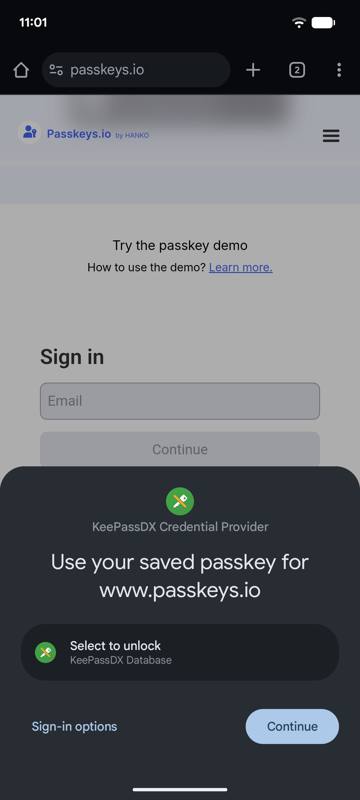
Modern KeePassDX versions act as an Android credential provider. This means you can create and use passkeys directly inside your encrypted database. Passkeys are the phishing-proof login standard. Passkeys stored in KeePassDX sync wherever your database file goes. As a result, you get the future of authentication without surrendering control to a platform vendor.
7. Entry templates, attachments and organization
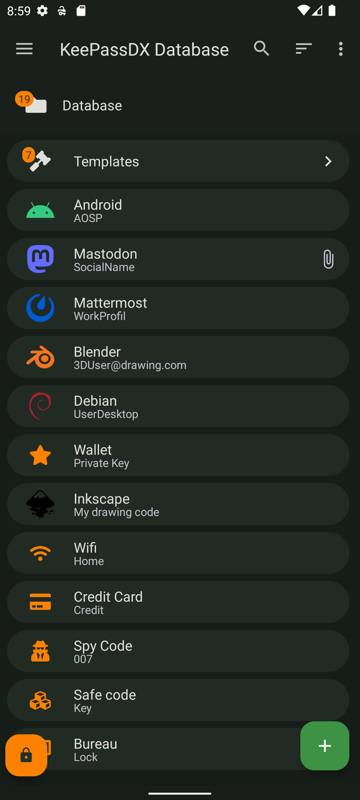
You can organize logins into nested groups. You can also attach files like license keys to entries. Furthermore, you can add custom fields, notes, and expiry dates. One-time-password (TOTP) codes are supported too. Templates speed up creating new entries, and the powerful search finds anything instantly — including text inside notes.
8. Lightweight, ad-free and open source
At roughly 17 MB, KeePassDX is a fraction of the size of cloud password managers, yet it is completely free, contains no ads, no trackers and no premium tier. The GPL-3.0 license is important here. It means the community can audit, fork, and improve the app forever. This is a level of transparency that closed password apps simply cannot match.
KeePassDX vs Bitwarden vs 1Password: An Honest Comparison
Let us be honest: Bitwarden is the best choice for effortless multi-device sync. You create an account, and your vault follows you everywhere. It also offers a generous free tier. 1Password is the most polished option, with beautiful apps and excellent family sharing, if you are willing to pay a subscription.
However, both require trusting a third party with your encrypted vault. In addition, both charge for the full experience. 1Password has no free tier at all. If their servers have a bad day, your logins are unreachable — and if they raise prices, you pay or you migrate.
The KeePassDX Trade-Off
KeePassDX’s trade-off is different. You take responsibility for syncing and backing up your database file. Admittedly, this asks a little more of you up front. In exchange, you get complete independence. There is no account, no subscription, and no server that can fail. Moreover, the file format is readable by dozens of apps on every platform. For privacy-focused users, security enthusiasts, and anyone who wants their password vault to outlive any company, KeePassDX wins on the fundamentals. For users who want ‘it just works’ sync across five devices with one tap, Bitwarden remains the easier pick.
KeePassDX APK Download for Android
Ready to take control of your passwords? Download the official KeePassDX app for Android using the button below. The link goes to the official GitHub releases page from the developer, where you can get the latest APK directly — always the safest source. (KeePassDX is also available on Google Play and F-Droid if you prefer those stores.)
How to Install the APK
- Tap the download button above and download the KeePassDX APK file (the ‘free’ or ‘libre’ build, around 17 MB) to your Android phone. When the download finishes, open the file from your notification shade or Downloads folder.
- If Android shows a prompt saying installs from this source are blocked, tap Settings on the prompt and enable ‘Allow from this source’ for your browser or file manager, then go back and tap the APK again.
- Tap Install, wait a few seconds, then tap Open. Create a new encrypted database, choose a strong master password, and start adding your logins — enable fingerprint unlock in the settings for fast daily access.
Tips and Tricks
Pick a master password that is long but memorable. For example, a passphrase of five or six random words works well. It is stronger and easier to type than a short jumble of symbols. Moreover, KeePassDX’s generator can create one for you. From day one, let the generator create a unique password for every site. After all, password reuse is the number one reason accounts fall.
Back up your .kdbx database file regularly to a second location — an encrypted USB drive, your own Nextcloud, or a trusted cloud folder. However, if your phone is lost and the file exists nowhere else, no one can recover it. That is the price of true privacy. Turn on biometric unlock for convenience, but never forget the master password itself, because biometrics alone cannot recover a database. If you prefer cloud-synced convenience with a free tier instead, the Bitwarden password manager is the closest alternative worth comparing.https://trendpkr.com/bitwarden-apk-download/
Frequently Asked Questions
Yes — KeePassDX is completely free and open source (GPL-3.0). There are no premium tiers, no ads, no trackers, and no features locked behind payment. Everything in the app is available to everyone, forever.
KeePassDX stores your passwords in an encrypted .kdbx file on your own device — nothing is uploaded anywhere unless you choose to sync the file yourself. The database uses AES-256 encryption with Argon2 key derivation, the open KeePass format is compatible with KeePassXC and other trusted apps, and the full source code is public so security researchers can audit it.
No. KeePassDX works fully offline and never asks you to create an account. An internet connection is only needed if you personally decide to sync your database file through a cloud service of your choice.
Yes. Because your vault is a standard .kdbx file, you can place it in Nextcloud, Google Drive, Dropbox, a WebDAV server, or transfer it via USB, then open the same file in KeePassXC on Windows, macOS or Linux. Any change made on one device syncs through the file, and the format stays compatible everywhere.
Nothing can recover it — not the developer, not anyone. That is by design: with no server and no account, there is no ‘reset password’ option. Store your master password somewhere safe (written on paper in a secure place is a legitimate strategy) before you fill the database with important logins.
Choose KeePassDX if you want a fully offline, open-source vault with no account, no subscription, and complete control over your data. Choose Bitwarden if you prefer effortless cloud sync across devices with zero setup and are comfortable trusting a reputable company with your encrypted vault. Many security enthusiasts actually use both: KeePassDX for their most critical secrets, Bitwarden for daily convenience.
Final Verdict
KeePassDX is the password manager for people who take ‘your data belongs to you’ seriously. There is no account, no cloud, no subscription, and no tracking. Instead, you get a fast, lightweight, open-source vault. It offers professional-grade encryption, fingerprint unlock, AutoFill, and even passkey support. The small price is that you manage your own syncing and backups. If you want maximum privacy and lifetime ownership of your passwords, download the KeePassDX APK and make the switch. Your logins have never been safer — or more truly yours.