Kodi APK Download v21.3 Omega for Android
| Developer | XBMC Foundation |
| Updated | October 2026 |
| Size | 65 MB (arm64) |
| Version | 21.3 "Omega" |
| Requirements | Android 7.0+ |
| Downloads | 10M+ |
Description
Downloading the Kodi APK is the fastest way to turn your Android phone, tablet, or TV box into a full home-theater system. Kodi is a free, open-source media center that organizes your movies, TV shows, music, and photos into a beautiful, TV-friendly library — no subscriptions, no accounts, and no ads anywhere in the app.
Version 21.3 “Omega” is the current stable release, and in this guide you’ll find everything about the Kodi APK download for Android: what’s new, how it compares with Plex and VLC, a step-by-step install walkthrough, and the official download link that always points to the latest safe build from the XBMC Foundation.
Kodi App Info
| App Name | Kodi |
| Status | Active & Updated |
| Version | 21.3 “Omega” |
| Size | 65 MB (arm64) |
| Developer | XBMC Foundation |
| Category | Media & Video |
| License | Free & Open Source (GPL-2.0) |
| Rating Average | 3.7/5 |
| Number of Votes | 341K+ (Google Play) |
| Downloads | 10M+ (Google Play) |
| Requires | Android 7.0+ |
| Updated | October 2026 |
What Makes Kodi Different
Kodi began life in 2002 as XBMC — the Xbox Media Center — and two decades of open-source development have turned it into something no other app quite matches: a media center that works entirely on your own terms. Most streaming apps today are locked storefronts. They decide what you can watch, charge you for the privilege, and track everything you do. Kodi flips that model. It plays your own files from your phone, a USB drive, a home NAS, or a server in your living room, and it asks for nothing in return.
That independence is exactly why the Kodi APK download stays popular year after year. There is no account wall, no premium tier hiding the good features, and no advertising. The whole program is free software under the GPL license, maintained by the non-profit XBMC Foundation and a global community of volunteers. If you care about owning your media instead of renting it from five different subscription services, Kodi is the closest thing to a personal Netflix that runs on your own hardware.
Key Features Explained
1. Gorgeous automatic library with posters and fanart
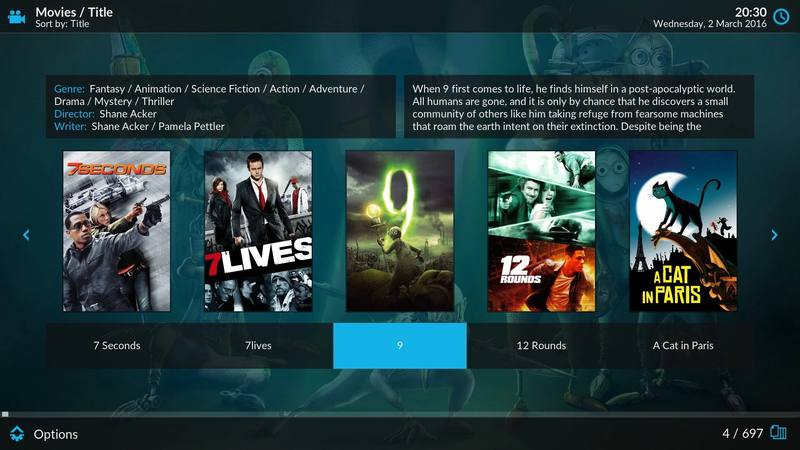
Point Kodi at a folder of movies or a TV season and it does the rest: it identifies every title, downloads posters, fanart, episode thumbnails, cast lists, and plot summaries, and presents them in a slick TV-style interface. What was a messy folder of files becomes a browsable library that looks better than most paid streaming apps.
2. Plays virtually every format without codec packs
Kodi handles MKV, MP4, AVI, HEVC/H.265, 10-bit video, FLAC, MP3, and even old ISO disc images natively. On Android it uses hardware decoding, so 4K files play smoothly without draining your battery or stuttering — no hunting for external codec packs ever.
3. The official add-on ecosystem
Hundreds of official add-ons extend Kodi: YouTube and Twitch clients, subtitle downloaders, podcast managers, weather widgets, and lyric displays. They install in one tap from the built-in repository, and because they’re curated by the Kodi team, they’re a world apart from sketchy third-party builds.
4. Works everywhere you already are
One Kodi APK covers Android phones, tablets, Android TV boxes, and Fire TV devices — and the same software runs on Windows, macOS, Linux, Raspberry Pi, and iOS. Learn the interface once and it follows you to every screen in the house.
5. Skins and total customization
Don’t like the default Estuary look? Dozens of skins reshape the entire interface — from minimal Netflix-style layouts to elaborate wall views. You can rearrange menus, change colors, and configure remote-control apps, making Kodi feel like software built just for you.
6. Music, photos, and live TV too
Kodi isn’t only for movies. It manages music collections with smart playlists and visualizations, displays photo slideshows, and with a PVR add-on plus a tuner it becomes a full live-TV DVR — recording shows and pausing live broadcasts.
7. Streams from your home network, no cloud needed
Kodi reads files over SMB, NFS, DLNA/UPnP, and FTP shares, so a movie stored on your PC or NAS plays instantly on your phone without uploading anything to a cloud service. Your media never leaves your home unless you want it to.
8. Free forever, no ads, no tracking
There is no Pro version, no subscription, and no advertising inside Kodi. It’s developed openly by volunteers, its code is audited and public, and it collects no viewing data. In an era of ad-filled “free” apps, that alone makes it worth the install.
Kodi vs Plex, Emby, and VLC: An Honest Comparison
Kodi’s closest rivals are Plex and Emby, which take the opposite approach: you run their server on one machine and stream to client apps. That setup shines for remote streaming and shared family libraries, and Plex’s client apps are undeniably polished. The catch is the paywall — Plex locks features like offline mobile downloads, hardware transcoding, and DVR behind a Plex Pass subscription, and its free tier pushes ad-supported content at you.
Kodi asks for no server and no subscription. Everything it does is free, and it’s far more customizable. The trade-off is convenience: Kodi doesn’t transcode or stream outside your home network as effortlessly as Plex, and its interface expects you to set up your own sources. If you want a self-hosted media setup with zero fees and full control, Kodi wins. If you want effortless remote streaming to family members across the country, Plex’s paid tier is the easier pick. Many people actually run both — Plex for remote access, Kodi for the living-room TV.
VLC is a different animal entirely: a superb video player, not a media center. It opens any file instantly but won’t organize your collection, fetch posters, or manage a TV library. Use VLC for quick file playback; use Kodi when you want a real home theater. Our LibreTube APK download guide covers another great free media app if you’re building a full media toolkit on Android.

Download Kodi for Android
Always download Kodi from its official source so you get a genuine, malware-free build. The button below takes you to the official Kodi Android download page, where the latest stable release (21.3 “Omega”) is available for arm64, arm, and x86_64 devices:
How to Install the APK
- Download the APK — tap the button above on your Android device and choose the APK matching your architecture (arm64-v8a for almost all modern phones and TV boxes).
- Allow unknown apps — when prompted, allow your browser or file manager to install unknown apps (Settings > Apps > Special app access > Install unknown apps).
- Install and open — open the downloaded file, tap Install, then launch Kodi and add your first media source under Videos, Music, or Pictures.
Tips and Tricks
Add your media as proper sources (Videos > Files > Add videos) rather than browsing raw folders — that’s what triggers the automatic poster and metadata magic. Turn on “Adjust display refresh rate” in Player settings for buttery 24fps movie playback, install the free Kore remote app to control Kodi from your phone, and keep your library healthy by enabling automatic library updates on startup so new files appear by themselves.
Frequently Asked Questions
Is Kodi really free?
Yes — completely. Kodi is free and open-source software under the GPL license. There are no ads, no premium tiers, and no paid features. The XBMC Foundation, a non-profit, coordinates its development.
Is Kodi legal to use?
Yes. Kodi itself is 100% legal software — it’s just a media player and library organizer. What matters is the content you play: stick to your own files and official add-ons and you’re fully in the clear.
What Android devices does the Kodi APK support?
The official APK supports Android 7.0 and newer, including phones, tablets, Android TV boxes, and Fire TV devices. Builds are available for arm64, 32-bit ARM, and x86_64 architectures.
Do I need an account to use Kodi?
No. Kodi works with zero accounts, zero sign-ins, and zero cloud services. Everything runs locally on your device and your home network.
How do I update Kodi on Android?
Download the newest APK from kodi.tv/download and install it over your existing copy — your library and settings are preserved. Updating through the Play Store works too, though official APK releases sometimes arrive there with a delay.
Which is better for a home theater: Kodi or Plex?
For a living-room TV with zero fees and maximum customization, Kodi wins — everything is free and it runs without a server. For easy remote streaming to family outside your home, Plex’s paid tier is more convenient. Many enthusiasts run both.
Final Verdict
Kodi remains the king of free home-theater software in 2026. It organizes your media beautifully, plays anything you throw at it, runs on nearly every device, and asks for nothing — no money, no account, no data. If you have a collection of movies, shows, or music and want a proper 10-foot interface on your TV or tablet, the Kodi APK download is one of the easiest wins in Android software.