Tusky APK Download v for Android
| Developer | Tusky |
| Updated | October 2026 |
| Size | 20 MB |
| Version | 33.1 |
| Requirements | Android 6.0 and up |
| Downloads | 500K+ |
Description
If you are looking for a tusky apk download that gives you the full Mastodon experience on Android — without ads, without tracking, and without a single Google service running in the background — you have come to the right place. Tusky is a free, open-source client for Mastodon and the wider fediverse: the decentralized network of independent social-media servers where no single company controls your timeline. It has been one of the most loved Android apps for Mastodon since 2017, and its latest release, v33.1, keeps polishing an already excellent formula.
Most social apps want you locked into their ecosystem. Your friends, your posts, your data — all of it lives inside one company’s walled garden, and if that company changes the rules, sells itself, or shuts down, you lose everything. Mastodon works differently. It is made of thousands of independent servers (called instances), all of which can talk to each other. And Tusky is your key to all of them: one app, as many accounts as you want, on any instance you choose — mastodon.social, fosstodon.org, or a tiny community server run by your friends.
In this guide you will learn what makes Tusky different from other social apps, explore its key features in detail — from multi-account support to scheduled posts and granular notification filters — compare it honestly against the official Mastodon app and other third-party clients, and download the official Tusky APK for Android with a simple step-by-step install guide. One important note: Tusky’s developers have moved development from GitHub to Codeberg, and the official download site at tusky.app now points you to F-Droid and Google Play — the version numbers below were verified against the current releases at publish time.
Tusky APK Download App Info
| App Name | Tusky |
| Status | Active & Updated |
| Version | 33.1 |
| Size | 20 MB |
| Developer | Tusky |
| Category | Communication |
| License | GPL-3.0 (open source) |
| Rating Average | 4.2/5 |
| Number of Votes | 4,339+ |
| Downloads | 500K+ |
| Requires | Android 6.0 and up |
| Updated | October 2026 |
What Makes Tusky Different
Tusky’s biggest difference is philosophy. Most social apps are built to harvest your attention and your data: the longer you scroll, the more ads you see, and the more precisely advertisers can target you. Tusky is built by a community of volunteers with no advertising business at all. There is no ad slot to fill, no engagement algorithm to feed, and no analytics beacon phoning home. The timeline shows posts in the order your instance published them, and that is the entire business model — there isn’t one. It is free software in the truest sense: free as in beer and free as in freedom, licensed under the GPL-3.0.
The second difference is age and maturity. Tusky has been in development since 2017, making it one of the oldest continuously maintained Mastodon clients on any platform. That long history shows in the details: every major Mastodon feature — lists, filters, bookmarks, polls, content warnings, scheduled posts, follow hashtags — is implemented and polished. New Mastodon server features get added promptly; the v33.x series, released through 2026, has steadily modernized the codebase while keeping the classic clean look that users trust. When you open Tusky, you feel that thousands of hours of refinement have gone into every screen.
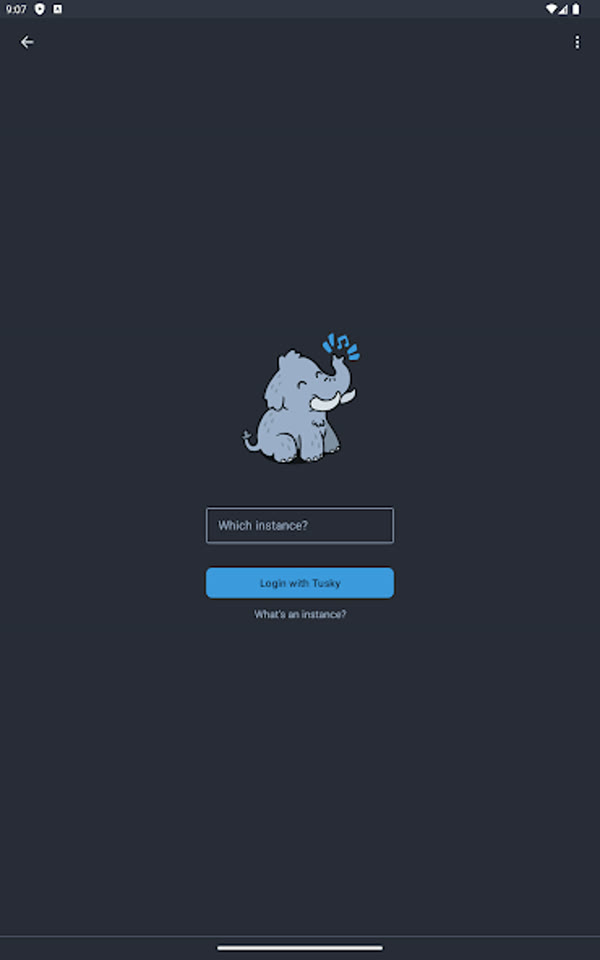
Third, Tusky is instance-agnostic by design. The official Mastodon app gently funnels you toward mastodon.social, the flagship instance. Tusky does the opposite: on first launch it simply asks “Which instance?” and lets you type any server address in the world. Run three accounts — a professional one on fosstodon.org, a creative one on mastodon.art, and a private one on a friend’s home server — and switch between them with two taps. No corporate gatekeeper decides which community you are allowed to join; the fediverse is yours to explore, and Tusky is the passport.
Finally, Tusky respects your privacy at the technical level. You can install it from F-Droid, where it contains no proprietary libraries and no Google Play Services dependency at all. It does not require a Google account, does not fingerprint your device, and does not sync your data to anyone’s cloud. Your login tokens stay in the app’s private storage on your own phone. In an era when mainstream social apps treat your contact list and your location history as assets, an app that simply… doesn’t collect them feels like a small act of rebellion.
Tusky APK Download: Key Features Explained
1. Clean, fast material-design timeline
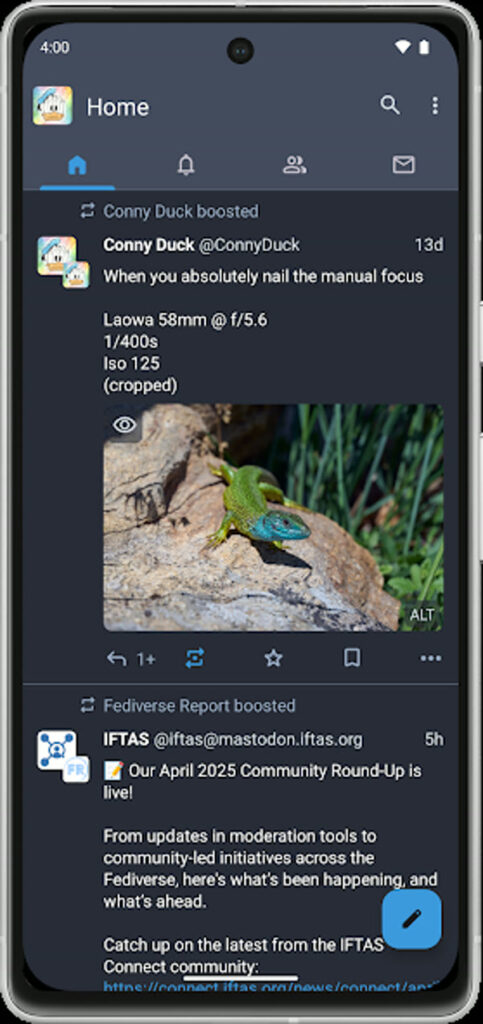
Open Tusky and you get a timeline that does exactly what a timeline should: show you posts from the people and hashtags you follow, newest first. No algorithm reshuffles your feed to maximize “engagement,” no injected ads pretending to be posts, no “suggested for you” clutter. The design follows Google’s material guidelines with a dark mode that is easy on the eyes at night, smooth scrolling even on older phones, and sensible defaults — you can mute boosts, hide media behind a tap, and always show or always hide content warnings. This tusky apk download feels fast because it is lean: a 20 MB app with no advertising SDKs dragging it down.
2. True multi-account support
One of Tusky’s standout strengths is how naturally it handles multiple identities. Add as many accounts as you like — across the same instance or different ones — and switch between them from the account drawer in two taps. Each account keeps its own timeline, notifications, drafts, and preferences, so your professional persona and your casual persona never collide. If you moderate a community or run a project account alongside your personal one, this alone makes Tusky worth installing. Push-notification routing respects the active account setup, so you never miss a mention wherever it lands.
3. Granular notification filters
Notification overload is the fastest way to hate a social app, and Tusky fights it with unusually fine control. Instead of a single on/off switch, you get separate toggles for mentions, follows, boosts, favorites, polls, and new posts — per account. Follow a very active hashtag? Mute its notifications while keeping mentions on. Run a popular account? Keep poll notifications off but direct messages loud. You can even set quiet hours. The result is a social app that pings you when something genuinely needs your attention and stays silent the rest of the time.
4. Drafts, scheduled posts and polls
Tusky’s composer is a power user’s dream. Start writing a post, get interrupted, and it is saved as a draft automatically — come back hours later and finish the thought. Planning an announcement for tomorrow morning? Schedule it for an exact time, and your instance publishes it while you sleep. Want to settle an argument? Built-in polls with multiple options, vote counts, and expiry timers work natively. Add content warnings to fold sensitive topics behind a tap, attach up to four images with descriptions for accessibility, and choose your audience per post: public, unlisted, followers-only, or direct message.
5. Works with any Mastodon or fediverse server
Tusky is not locked to one company’s servers. It speaks the Mastodon API, which is also implemented by compatible fediverse software, so you can log into virtually any Mastodon instance — and many GoToSocial and compatible servers — with the same app. Moving to a new server? Log out, type the new address, done; your app, your drafts, and your preferences come with you. This is what decentralization feels like in practice: the client is yours, the server is a choice, and neither can hold the other hostage.
6. Lists, filters and hashtags done right
As your follow count grows, the home timeline gets noisy — Tusky gives you the tools to stay in control. Create lists to group accounts into topics (tech news, friends, artists) and read each list as its own clean timeline. Build keyword filters that automatically hide posts containing words, phrases, or hashtags you don’t want to see — perfect for dodging spoilers or heavy topics — with expiry timers so a filter can lift itself after a week. Follow hashtags directly to add their posts to your timeline, and pin your favorite hashtags for one-tap access. It is the kind of thoughtful organization mainstream apps deliberately refuse to give you.
7. Full-featured media and accessibility support
Tusky treats media seriously. Attach photos and videos, mark them as sensitive when appropriate, and add image descriptions so screen-reader users can enjoy what you share. The built-in media viewer supports pinch-to-zoom and swiping through galleries, and the app respects your data with settings for autoplay and high-quality media only on Wi-Fi. Federated timelines — the public firehose of your instance and the wider network — are one tap away when you want to discover new people, and your own bookmarks and favorites keep the posts you want to revisit.
8. No ads, no tracking, fully open source
This one deserves its own entry: Tusky contains zero advertising, zero analytics, and zero tracking SDKs. The entire source code is published under the GPL-3.0 license on Codeberg, where anyone can read it, audit it, or contribute. Development is funded by voluntary donations through Open Collective, not by selling your attention. The F-Droid build is even free of proprietary Google libraries, so you can run the complete fediverse experience on a de-Googled phone. When an app’s code is public and its funding is transparent, you don’t have to trust its privacy claims — you can verify them.
Tusky vs Other Mastodon Apps: An Honest Comparison
So how does this tusky apk download stack up against the alternatives? The official Mastodon app is the most polished-looking client and the easiest onboarding for absolute beginners — but it nudges you toward mastodon.social, offers weaker multi-account support, and lacks Tusky’s depth of notification filters, lists, and scheduling. If you just want the simplest possible start, the official app is fine; if you want control, Tusky wins.
Megalodon is Tusky’s closest rival on Android — also open source, also feature-rich, with a more modern visual style and some power features of its own. Honestly, both are excellent, and the choice comes down to taste: Megalodon feels newer and flashier, Tusky feels steadier and more refined, with a longer track record and a larger community. Mona and Ivory are superb — but iOS-only, so irrelevant here. Fedilab is a strong multi-network alternative if you also use Pixelfed or PeerTube, though its interface is busier than Tusky’s.
The honest trade-offs: Tusky’s design is classic rather than trendy — if you want a radically modern UI, Megalodon may appeal more. Development is volunteer-driven, so headline features sometimes arrive a little later than in corporate-backed apps (though v33.x has been landing steadily through 2026). And because Mastodon itself is decentralized, no client — Tusky included — can fix the fediverse’s real weakness: finding your friends from other networks is still harder than it should be. But for the core job of using Mastodon well on Android, Tusky remains the benchmark other clients are measured against.
Download Tusky APK for Android
Ready to join the fediverse? Get the official Tusky release for Android using the button below. The download links to the app’s official site, which offers the current version through F-Droid and Google Play — both are safe, official distribution channels maintained by the Tusky team.
If you enjoy privacy-respecting, open-source communication tools, you may also like our guide to Signal APK download — the encrypted messenger with the same no-ads, no-tracking philosophy.
How to Install the Tusky APK
- Download the app — tap the download button above and install Tusky from F-Droid or Google Play (both are official channels). If you sideload an APK file directly, your browser will ask you to allow installs from unknown sources — grant it just for this install.
- Choose your instance — open Tusky and type the address of the Mastodon server you want to join (for example, mastodon.social). Don’t have one yet? Visit joinmastodon.org to browse servers by topic and language, then come back and log in.
- Log in and explore — sign in with your Mastodon account (or create one on the server’s website first), grant Tusky access, and start following people, hashtags, and lists. Your timeline is ready — newest posts first, no algorithm in sight.
Tips and Tricks for Tusky
New to the fediverse? A few habits will make Tusky dramatically better. First, curate aggressively early: follow a dozen hashtags in your interests on day one — your timeline fills up instantly instead of feeling empty. Second, use lists for high-volume follows: news bots and prolific posters belong in lists you check intentionally, not in your main timeline. Third, set up a keyword filter for one topic you want a break from (spoilers, politics, sports scores) and give it a one-week expiry. Fourth, enable scheduled posts for announcements — posting when your audience is awake matters even without an algorithm. And finally, write image descriptions on your uploads: it takes ten seconds and makes your posts accessible to everyone. Small courtesies are the fediverse’s whole culture.
Frequently Asked Questions
Yes, Tusky is completely free with no ads, no premium tier, and no locked features. There is no catch: it is developed by volunteers and funded by optional donations through Open Collective. The source code is public under the GPL-3.0 license, so anyone can verify there is nothing hidden inside.
Yes. Tusky is open source, contains no tracking or analytics code, and stores your login tokens only on your own device. It connects directly to the Mastodon server you choose using encrypted HTTPS. Your privacy ultimately also depends on the server you pick — choose a well-run instance with a clear privacy policy.
Pick a server whose topic, language, and rules fit you — you can still follow and interact with people on every other server. General-purpose servers like mastodon.social are fine for beginners; topic servers (art, tech, gaming) give you an instant community. Browse options at joinmastodon.org, and remember you can move your account later without losing followers.
Yes. Tusky is available on F-Droid, where the build contains no proprietary Google libraries at all, so it runs perfectly on de-Googled phones and custom ROMs. You only need a Mastodon account — no Google account is involved at any step.
The Tusky team moved development from GitHub to Codeberg, a community-run, non-profit code hosting platform, to align with the project’s open-source values. The current releases (including v33.1) are published at codeberg.org/tusky/Tusky, and the official site at tusky.app links to the F-Droid and Play Store downloads.
Create an account on a Mastodon server, install Tusky, and log in. Use tools like Fedifinder or Movetodon to find which accounts you followed on X have moved to the fediverse, follow them, and add a few hashtags you care about. Give it two weeks of regular use — the chronological timeline feels strange at first, then the algorithmic feeds start feeling strange instead.
Final Verdict
Tusky is the Android Mastodon client against which all others are judged — and after nearly a decade of steady development, it has earned that position. It is free, open source, ad-free, and respectful of your privacy; it supports every Mastodon feature that matters, from multi-account juggling to scheduled posts and fine-grained notification filters; and it works on any server in the fediverse without funneling you anywhere. If you want social media without the surveillance business model, this tusky apk download is the single best first step you can take on Android. Install it, pick your instance, and take back your timeline.