Syncthing File Sync APK Download for Android
| Developer | Syncthing |
| Updated | December 2024 |
| Size | 49 MB |
| Version | v1.28.1 |
| Requirements | Android 5.0 and up |
| Downloads | 500K+ |
Description
If you are searching for a syncthing apk download that keeps your files identical on your phone, laptop and desktop — without handing them to a cloud company first — you have found the right guide. Syncthing is a free, open-source file synchronization program that copies files directly between your own devices. There is no account to create, no subscription tier, no storage quota, and no third-party server ever touching your data. Your phone and your computer simply talk to each other, encrypted end to end, and keep every folder you choose perfectly in sync.
Think about how you move files today. A document lives on your phone and you need it on your laptop, so you email it to yourself or upload it to a cloud drive, wait for it to upload, then download it again on the other side. That detour costs time, eats mobile data, and — most importantly — places a copy of your private files on someone else’s server, governed by a privacy policy you did not write. Syncthing removes the middleman entirely: the file travels straight from one of your devices to the other, over your own Wi-Fi or the internet, protected by strong encryption that only your devices can unlock.
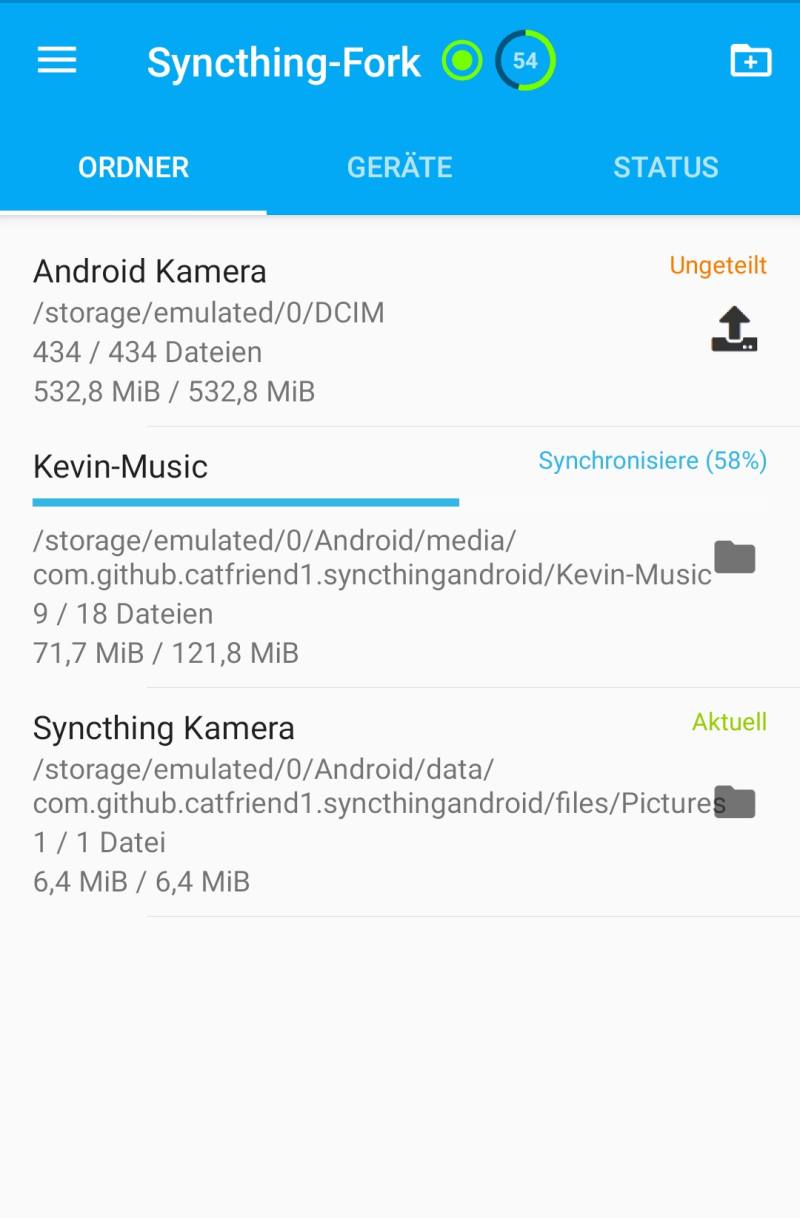
In this guide you will learn what makes Syncthing different from cloud storage, explore its key features in detail — from device-to-device sync to per-folder sharing — compare it honestly against Google Drive, Dropbox and Resilio Sync, and download the official Syncthing APK for Android with a simple step-by-step install guide. One honest note up front: the official Android app reached its final release, v1.28.1, in December 2024, and its maintainer has discontinued it. The app still works, but for ongoing updates the community fork “Syncthing-Fork” (on F-Droid and Google Play) is the actively maintained continuation — more on that below.
Syncthing APK Download App Info
| App Name | Syncthing |
| Status | Final release — official Android app discontinued Dec 2024 |
| Version | v1.28.1 |
| Size | 49 MB |
| Developer | Syncthing |
| Category | Tools |
| License | MPL-2.0 |
| Rating Average | 4.1/5 |
| Number of Votes | 6.2K+ |
| Downloads | 500K+ |
| Requires | Android 5.0 and up |
| Updated | December 2024 |
What Makes Syncthing Different
Most file sync tools are cloud services wearing a sync costume. When you “sync” with Google Drive or Dropbox, your files are really being uploaded to a company’s data center, stored there, and then downloaded to your other devices. The company can scan them, is legally compelled to hand them over in some jurisdictions, and can change the terms whenever it wants. Syncthing is built on the opposite idea: your data is your data alone, and you deserve to choose where it is stored.
First, there is no cloud at all. Syncthing discovers your devices — on your local network or across the internet — and transfers files directly between them. Nothing is stored on any server that is not yours. If you sync a folder between your phone and your laptop, the bits travel from phone to laptop and stop there. This is not just a privacy win; it is also a speed win on local networks, where transfers run at full Wi-Fi speed instead of being throttled by an upload to a distant data center.
Second, everything is encrypted in transit with modern cryptography, and device identity is based on cryptographic certificates, not usernames and passwords. Each device gets a long device ID; you add devices to each other by exchanging these IDs (usually by scanning a QR code). There is no login, which means there is no password to phish, no account to hijack, and no “sign in with Google” gate between you and your own files.
Third, it is genuinely free and open in a way few tools are. The source code is published under the MPL-2.0 license, the protocol is documented, and the project is community-driven. There is no premium tier holding features hostage, no “upgrade to sync more than 3 devices” upsell. You can sync as many folders across as many devices as you like, forever.
Syncthing APK Download: Key Features Explained
1. Direct device-to-device sync, no cloud
The core of this syncthing apk download is peer-to-peer synchronization. Your devices find each other automatically — on the same Wi-Fi network they connect instantly, and across the internet they use relay and discovery servers that only help devices find each other, never seeing your file contents. Once connected, files move straight between your devices. A 2 GB video folder syncs from your phone to your laptop at full local-network speed, with no upload cap and no waiting for a cloud round-trip.
2. End-to-end encrypted transfers
Every byte that leaves your device is encrypted with TLS using per-device certificates. Only the devices you explicitly paired can decrypt the stream. Even if your traffic passes through a public relay server to reach a device across the internet, the relay operator sees nothing but encrypted noise. Combined with the fact that no file is ever stored on third-party infrastructure, this makes Syncthing one of the most private sync tools available.
3. Sync any folder with any device
Unlike cloud drives that force everything into one special folder, Syncthing lets you pick any folder on your device and share it with any of your devices. Share your phone’s camera folder with your laptop, your documents folder with your desktop, or a project folder between two computers. Each folder gets its own settings: you can choose one-way “send only” or “receive only” sync, or full two-way synchronization, per folder, per device.
4. Works on Android, Windows, Linux and macOS
Syncthing is truly cross-platform. The same folders can sync between your Android phone, your Windows laptop, a Linux server and a Mac. The Android app wraps the same battle-tested sync engine as the desktop versions, with a mobile-friendly interface for managing folders and devices. Install it on each machine you own and they all stay in step automatically.
5. No account, no subscription, no limits
There is nothing to sign up for and nothing to pay. Device pairing uses QR codes and cryptographic IDs instead of accounts. You can add unlimited devices and sync unlimited folders — the only limits are your own storage and bandwidth. For comparison, free cloud tiers typically cap you at 2–15 GB and nag you to upgrade; Syncthing has no such ceiling because there is no service to monetize.
6. Fully open source (MPL-2.0)
The entire codebase is public and licensed under the Mozilla Public License 2.0. Security researchers can audit the encryption, developers can build on the protocol, and the community can keep the project alive regardless of any single company. This openness is also why the ecosystem keeps growing: when the official Android app was discontinued, the community fork picked up development without missing a beat.
7. Versioning and conflict handling
When the same file changes on two devices before they sync, Syncthing does not silently overwrite one copy. It detects the conflict, keeps both versions, and marks the conflicted file clearly so you can decide. Optional file versioning keeps older copies of files on a schedule you choose — simple trash-can versioning, staggered versions, or external versioning scripts. Accidentally deleted a file on your phone? Pull yesterday’s copy back from the version history.
8. Battery and network aware
The Android app respects your phone’s constraints. You can restrict syncing to Wi-Fi only (the default), limit it to when the phone is charging, or pause sync entirely with one tap. Discovery and connection management are efficient, so the app does not drain your battery hunting for devices all day. These controls make it practical to keep large folders syncing in the background without noticing any impact.
Syncthing vs Google Drive, Dropbox and Resilio: An Honest Comparison
How does Syncthing stack up against the names everyone knows? Here is the honest picture.
Vs Google Drive: Drive wins on convenience features — deep integration with Google’s office apps, easy web sharing links, and collaboration on documents. But Drive gives you 15 GB free shared across all Google services, scans your content, and requires a Google account for everything. Syncthing gives you unlimited sync with zero accounts and zero scanning, but you provide your own storage and there is no built-in document collaboration. If you want private, unlimited sync of your own files, Syncthing wins; if you live inside Google Docs, keep Drive for that.
Vs Dropbox: Dropbox is the polished, simple cloud drive — excellent apps, reliable sync, but only 2 GB free and increasingly expensive paid plans. Syncthing matches Dropbox’s core job (keeping folders identical across devices) with no storage cap and no fee, but without Dropbox’s slick sharing links and third-party integrations. For personal multi-device sync, Syncthing is the better deal; for sending a quick share link to a client, Dropbox still has the edge.
Vs Resilio Sync: Resilio is Syncthing’s closest relative — also peer-to-peer, also no cloud. The difference is philosophy: Resilio is proprietary with a paid “Pro” tier gating features like selective sync, while Syncthing is fully open source with everything free. Resilio’s apps are arguably more polished, but Syncthing’s openness means no vendor lock-in and community continuity, as the Syncthing-Fork story proves.
The honest trade-off: you give up cloud convenience features (share links, web previews, office collaboration) and take on a small setup task (pairing devices once). You gain unlimited, private, account-free sync that no company can take away, throttle, or monetize. For keeping your own files in sync across your own devices, that is a trade worth making.

Download Syncthing APK for Android
Ready for this syncthing apk download? Get it from the official source — syncthing.net — which links to the verified Android builds on Google Play and F-Droid. Always download from the official source to avoid modified or fake copies.
One important note: the official Android app’s final release is v1.28.1 (December 2024). It still installs and works, but for active development and newer Android versions, the community recommends Syncthing-Fork — the maintained continuation, available on F-Droid and Google Play, built from the same sync engine.
How to Install the Syncthing APK
- Step 1 — Download the APK. Tap the download button above to reach syncthing.net, then choose the Android build from Google Play or F-Droid. The app is about 49 MB, so Wi-Fi is recommended.
- Step 2 — Allow installs from your browser. When Android asks, allow your browser to install unknown apps (Settings → Apps → your browser → Install unknown apps). This is the standard Android step for installing any APK from outside Google Play, and it is completely normal.
- Step 3 — Install, pair your devices, and share a folder. Tap the downloaded file, confirm the installation, then open Syncthing on your phone and your computer. On each device, add the other by scanning its QR code (shown in the app), then choose which folders to share. That is it — files start syncing immediately, no account needed.
Tips and Tricks
Start with one folder. Share your phone’s camera folder with your computer first. Watching photos appear on your laptop seconds after you take them is the fastest way to understand what Syncthing does.
Keep sync on Wi-Fi only. In the Android app settings, leave “Sync only on Wi-Fi” enabled so large folders never burn through your mobile data.
Use “Send Only” for backups. Set your phone’s folders to Send Only and your computer’s copy to Receive Only — now your computer is a one-way backup that your phone can never accidentally wipe.
Try Syncthing-Fork for ongoing updates. Since the official Android app ended at v1.28.1, install the fork from F-Droid — it tracks the latest sync engine and newer Android versions while keeping the same interface and your existing device pairings.
Give devices clear names. “Pixel-8” and “Home-PC” beat “android-a1b2c3” when you are managing five devices and a dozen folders.
Enable file versioning on important folders. A simple trash-can versioner on your documents folder means an accidental delete is a two-tap recovery, not a disaster.
Frequently Asked Questions
Is Syncthing really free?
Yes, completely free with no catches. There are no subscriptions, no storage quotas, and no premium features locked behind payment. The project is open source under the MPL-2.0 license and community-driven — it costs nothing to sync unlimited folders across unlimited devices.
Is my data private with Syncthing?
Yes — this is the entire point of the design. Files travel directly between your own devices with TLS encryption, and no file is ever stored on a third-party server. There is no account, so there is no central database of your identity or activity. The code is public and audited, so the privacy claims are verifiable rather than just promised.
Does Syncthing need an internet connection?
Not necessarily. On your home Wi-Fi, devices sync directly with no internet at all. Across the internet, devices use public discovery and relay servers to find each other — these servers only pass along encrypted traffic and never see your file contents. If both devices are on the same local network, everything stays local.
Why was the official Android app discontinued?
The maintainer of the official Android wrapper ended development after v1.28.1 (December 2024) and archived the project. The app still works, but it will not receive updates. The community fork “Syncthing-Fork” continues active development on F-Droid and Google Play, built on the same sync engine, and is the recommended path for ongoing updates.
Can I sync between Android, Windows, Linux and macOS?
Yes. Syncthing runs on all major platforms, and any combination of devices can sync with each other. Install the desktop version from syncthing.net on your computers, the Android app (or Syncthing-Fork) on your phone, pair them once with QR codes, and every shared folder stays identical everywhere.
How is Syncthing different from Google Drive or Dropbox?
Cloud drives upload your files to a company’s servers and sync them back down — with storage limits, subscriptions, accounts, and content scanning. Syncthing skips the server entirely: files move directly between your devices, encrypted, with no accounts, no limits, and no one else ever holding a copy. You trade cloud conveniences like share links for unlimited private sync.
Final Verdict
Syncthing is the rare tool that does exactly what it promises: it keeps your files identical across all your devices with no cloud, no account, and no cost. The official Android app’s discontinuation is a wrinkle, not a dealbreaker — v1.28.1 still works, and Syncthing-Fork carries the torch with active development. If you want your photos, documents, and projects to follow you from phone to laptop without passing through anyone else’s servers, there is no better option. The syncthing apk download above comes from the official source — take back control of your files.