F-Droid APK Download v for Android
| Updated | October 2026 |
| Size | 12 MB |
| Version | 1.22.0 |
| Requirements | Android 5.0+ |
| Downloads | 10M+ |
| Get it on |  |
Description
Introduction
Looking for an f-droid apk download you can trust? Every Android phone comes with the Play Store — and the Play Store is fine, until it is not. Until the app you need is geo-blocked in your country. Or a great open-source app gets removed for vague policy reasons. Until you realize Google logs every install, links it to your identity, and feeds it into an advertising profile. F-Droid exists for everyone who has hit those walls.
F-Droid is a community-run app store containing thousands of free and open-source Android apps — no Google account required, no ads, no tracking, no region locks. Developers build every app in the catalogue from publicly available source code, so what you install is verifiably what they published. In this guide, we therefore explain what makes F-Droid special, what you will find inside, and how to download and install the official APK. By the end, you will have a second app store on your phone — one that respects you.
App Info
| App Name | F-Droid |
| Status | Active & Updated |
| Version | 1.22.0 |
| Size | 12 MB |
| Developer | F-Droid Limited |
| Category | Tools |
| License | Free & Open Source |
| Rating Average | 4.4/5 |
| Number of Votes | 120K+ |
| Downloads | 10M+ |
| Requires | Android 5.0+ |
| Updated | October 2026 |

What Exactly Is F-Droid?
Think of F-Droid as an app store with a strict door policy: every app must be free and open source, with no hidden trackers or proprietary blobs. Volunteers review each submission, build the app from source on F-Droid’s own servers, and sign it — so you can be sure the APK you download matches the public code.
The catalogue holds over 4,000 apps spanning every category: ad blockers, podcast players, email clients, file managers, keyboards, launchers, games, and privacy tools you will not find on the Play Store. In fact, many of the apps featured on this very site — AntennaPod, K-9 Mail, Bitwarden, NewPipe — live on F-Droid first.
Why Use F-Droid Instead of (or Alongside) the Play Store?
No account, no tracking. F-Droid works with zero sign-in. There is no identity linked to your downloads, no “recommended for you” profiling, and the app itself contains no analytics.
Apps the Play Store will not allow. Ad blockers that work system-wide, YouTube clients without ads, apps that let you download videos for offline viewing — entire categories of useful software are banned from the Play Store but thrive on F-Droid.
No geo-blocking. If an app is free and open source, it is available to everyone, everywhere. Your country does not determine your software.
Verifiable security. Because every app is built from public source, security researchers can audit anything. The reproducible-builds initiative goes further: for many apps, anyone can verify the published APK was built from the published code, byte for byte.
Automatic updates. F-Droid checks for updates to all your installed apps — including apps you installed from elsewhere — and can update them in the background, just like the Play Store.
Key Features Explained
Curated open-source catalogue. Browse 4,000+ apps organized by category, each with screenshots, descriptions, changelogs, and links to source code and issue trackers. “Anti-feature” warnings transparently flag apps with known downsides (like depending on non-free services), so there are never surprises.
Repositories beyond the main one. F-Droid supports third-party repositories — the developers of an app can run their own repo with faster releases. Adding a repo is as simple as scanning a QR code, and popular ones like IzzyOnDroid host hundreds of additional apps.
Privileged extension for seamless updates. On rooted phones or with a system extension, F-Droid can install and update apps silently in the background with no prompts — the full Play Store experience without Google.
Nearby app sharing. No internet? F-Droid can share apps directly with nearby devices over local Wi-Fi or Bluetooth — genuinely useful when traveling or in areas with poor connectivity.
Full version history. Every version of every app ever published stays available. If an update breaks something you rely on, roll back to the previous version in seconds — something the Play Store simply does not allow.
Dark mode and modern design. The 1.x releases brought a complete Material Design overhaul: clean, fast, and easy on the eyes, with proper dark theme support.
What Will You Find on F-Droid? (Highlights)
New users often ask where to start. Here is a starter pack of essential F-Droid apps: NewPipe (lightweight YouTube client with background play and downloads), AntennaPod (podcast player), K-9 Mail (email), Bitwarden (password manager), Aegis Authenticator (two-factor codes), Simple Gallery and the Simple Mobile Tools suite (clean replacements for stock apps), OsmAnd (offline maps), Joplin (notes), KeePassDX (offline password vault), and NetGuard (firewall without root). That single list replaces a dozen Play Store apps — all free, all tracker-free.
F-Droid vs Play Store vs Aurora Store: An Honest Comparison
The Play Store wins on sheer catalogue size and convenience — every commercial app lives there, and paid apps with license checks only work through it. For example, if you need banking apps or games with in-app purchases, you still need the Play Store.
Alternatively, Aurora Store is a clever middle ground: it downloads apps from the Play Store anonymously, without a Google account. Great for de-Googled phones that still need Play Store apps.
F-Droid’s unique value is trust and freedom: everything is open source, nothing tracks you, and no one can remotely remove anything from the store for business reasons. Ultimately, the honest setup for most privacy-minded users is F-Droid as the daily driver, Aurora Store for the few Play Store apps they cannot avoid, and the Play Store itself only if they must.
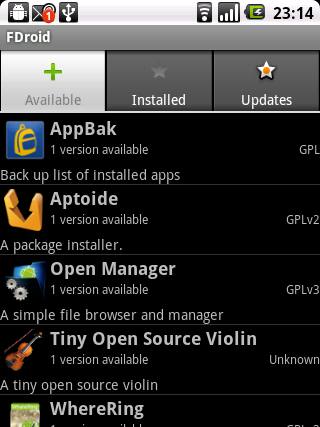
F-Droid APK Download for Android
This is the official F-Droid site — tap “Download F-Droid” on the homepage to get the genuine APK. The F-Droid team signs every release themselves.
How to Install the F-Droid APK
- First, tap the download button above, then tap “Download F-Droid” on f-droid.org (about 12 MB).
- Next, open the downloaded file. When Android asks, tap Settings and enable “Allow from this source” for your browser.
- Finally, tap Install, then Open. F-Droid will fetch the latest app catalogue (a minute on first run), and then you can browse and install apps freely.
Staying Safe While Sideloading
F-Droid itself is safe, but installing it teaches you a skill worth using carefully: sideloading. The golden rule is simple — only install APKs from sources you trust completely. For example, F-Droid earns that trust through verifiable builds, while a random APK site does not. Never enable “install unknown apps” globally — grant it per-app, only to your browser or file manager, and revoke it when you are done.
Also beware of fake F-Droid clones. The only official site is f-droid.org. For instance, if you ever see “F-Droid Pro” or a version asking for payment or excessive permissions, you are looking at a scam — the real F-Droid is free and asks for nothing beyond what an app store needs.
Tips and Tricks for F-Droid Users
- First, add the IzzyOnDroid repo for faster updates and extra apps: in F-Droid, go to Settings → Repositories and add it via the QR code on izzyondroid.com.
- Next, enable automatic updates: Settings → Updates → enable “Automatically install updates” so your apps stay current without prompts.
- Also, use the “Nearby” feature to share apps with friends offline — great for getting family onto privacy-respecting apps.
- Finally, check anti-features before installing: tap any app and scroll to the anti-features section to see exactly what you are getting.
Frequently Asked Questions
Yes. Volunteers build every app from public source code on F-Droid’s servers and review each submission. As a result, this verifiable build process is arguably more trustworthy than the Play Store’s automated scanning.
Completely. It is a legitimate alternative app store. In fact, sideloading APKs is a supported Android feature.
No. F-Droid works on any Android phone. Instead, root only enables silent background updates via the privileged extension.
For open-source apps, yes. However, you will still need the Play Store (or Aurora Store) for proprietary apps like banking, ride-hailing, or games with license checks.
F-Droid only accepts fully open-source apps. Many popular apps include proprietary components or trackers, which disqualifies them. Therefore, check if the developer offers an F-Droid-compatible build or their own repo.
F-Droid notifies you of updates for all apps it manages and can install them automatically. In addition, it can even update apps you originally installed from elsewhere, as long as the signatures match.
Final Verdict
Ultimately, F-Droid is more than an app store — it is a statement that your phone should answer to you, not to an advertising company. In short, with thousands of excellent free apps, verifiable security, and zero tracking, it belongs on every Android device. Download the official APK above and start exploring.
First stop after installing? For instance, grab NewPipe, AntennaPod, and Bitwarden straight from F-Droid’s search — three apps, zero trackers, and your phone already feels like yours again.