Termux Terminal Emulator APK Download v for Android
| Developer | Termux |
| Updated | May 2025 |
| Size | ~34 MB (arm64 build) |
| Version | 0.118.3 |
| Requirements | Android 7.0 and up |
Description
If you are looking for a termux apk download that turns your Android phone into a genuine Linux machine, this is the guide you need. Termux is a free and open-source terminal emulator that gives you a full Linux environment on Android. You get a real shell, a real package manager, and thousands of real packages — all without rooting your phone, paying a cent, or tolerating a single ad.
For years, the dream of “Linux on my phone” meant awkward compromises: toy terminals with no packages, root-only hacks that voided your warranty, or heavyweight virtual machines that drained your battery in an hour. Termux took a different path. It compiles the familiar GNU/Linux userland natively for Android’s hardware. As a result, Python, Git, Node.js, OpenSSH, Vim and hundreds of other tools run directly on your device’s CPU. They are fast, lightweight, and sandboxed just like any normal app.
The numbers speak for themselves. Termux has earned more than 62,000 stars on GitHub, making it one of the most starred open-source Android projects in the world. It is maintained by a dedicated community and released under the GPL-3.0 license, so anyone can audit or improve it. In addition, it is distributed for free through its official GitHub releases and F-Droid. Developers, students, system administrators and curious tinkerers all carry it in their pockets.
In this guide, you will learn what makes Termux different from the imitation terminal apps. You will also explore its key features in detail and compare it honestly against alternatives like UserLAnd and Andronix. Finally, you will download the official Termux APK for Android with a simple three-step install guide.
App Info: Termux APK Download
| App Name | Termux |
| Status | Active & Updated |
| Version | 0.118.3 |
| Size | ~34 MB (arm64 build) |
| Developer | Termux (community project) |
| Category | Tools |
| License | Free & Open Source (GPL-3.0) |
| Rating Average | Community-rated 4.5/5 (no store rating) |
| Number of Votes | 62K+ (GitHub stars) |
| Downloads | Millions via F-Droid & GitHub (not on Google Play) |
| Requires | Android 7.0 and up |
| Updated | May 2025 |
What Makes This Termux APK Download Different
Most “terminal” apps in app stores are cosmetic. They give you a black screen with a blinking cursor and a handful of built-in commands. However, the moment you try to install anything real, you hit a wall. Termux is fundamentally different: it is not a simulation of a terminal, it is a terminal. Under the hood, it ships a minimal bootstrap of a real Linux distribution, compiled for your phone’s processor. Consequently, it can install genuine upstream software — the same Python, the same Git, the same OpenSSH you would get on a Debian desktop.
The second difference is the package ecosystem. Termux maintains its own package repository with more than a thousand packages, built and tested by its maintainers. Installing something is as simple as typing pkg install python and waiting a few seconds. Compare that with the alternatives. There, “installing Python” means downloading a sketchy APK from a forum and hoping it works. The repository also keeps everything updated. For example, one pkg upgrade command refreshes your entire environment, exactly like apt upgrade on Ubuntu.
Honest About What Termux Is Not
The third difference is honesty about what it is not. Termux does not pretend to be a full desktop Linux replacement. It will not magically turn your phone into a gaming PC. In addition, it will not bypass Android’s sandbox in ways that compromise your security. What it gives you instead is something more valuable for daily use. You get a dependable, scriptable, always-with-you Linux shell that plays by Android’s rules. That discipline is why developers trust it for real work — SSH sessions, Python scripts, Git commits, static site builds — from a bus seat.
Finally, there is the question of trust and longevity. Termux is developed in the open. Every commit, every package recipe and every design discussion is visible on GitHub. Moreover, the GPL-3.0 license guarantees it stays free and modifiable forever. It is also refreshingly honest about distribution. The Google Play Store builds were deprecated years ago because of Android policy conflicts. As a result, the project now points users to its GitHub releases page and F-Droid — the two sources that always carry the current, maintained build.
Key Features of the Termux APK Download
A Real Linux Terminal, Not a Gimmick
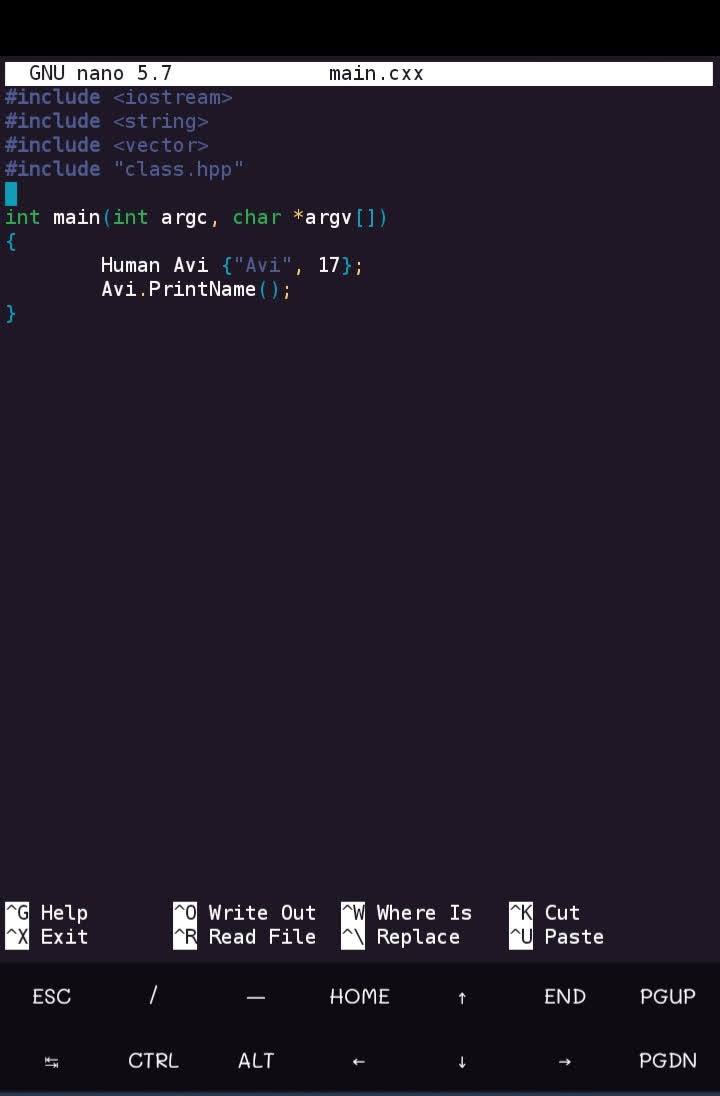
Open Termux and you get a genuine Bash (or Zsh, if you prefer) shell running on your phone’s actual CPU. Tab completion works. Pipes work. Shell scripts work. You can write a Python program in the nano editor, compile it with a real compiler, and run it. This is exactly the workflow shown in the screenshot above. Everything you know from desktop Linux transfers directly. Therefore, Termux is a legitimate learning environment for anyone studying the command line. There is no artificial limitation layer between you and the tools.
The pkg Package Manager
Termux’s pkg command is a friendly wrapper around the APT package system. It gives you access to a curated repository of more than a thousand packages. pkg search finds software, pkg install fetches and sets it up, and pkg upgrade keeps everything current. The repository is maintained by the Termux team, and mirrors are available worldwide. In addition, packages receive security updates. For users coming from Ubuntu or Debian, the experience feels instantly familiar — because underneath, it genuinely is the same tooling philosophy.
Python, Node.js, Git, SSH and Hundreds More
The package list reads like a developer’s wish list. It includes Python, Node.js, Ruby, Go and Rust toolchains, Git and Mercurial for version control, and OpenSSH client and server. As a result, your phone can SSH into other machines — or accept SSH connections itself. You also get Vim, Nano and Emacs for editing, FFmpeg for media processing, and even text-mode web browsers. A student can learn programming on a phone with no computer at home. Meanwhile, a sysadmin can carry an emergency SSH kit. A writer can sync drafts with Git. The use cases multiply because the tools are the real thing.
No Root Required
Perhaps the most liberating feature: Termux needs no root access. Everything runs inside Android’s normal app sandbox, in Termux’s private directories, using techniques that require no system modifications. That means no voided warranty, no tripped Knox counter, no banking apps breaking — and no security nightmare from a rooted device. If your device is rooted, Termux can use that for extra capabilities like accessing system partitions. However, the standard experience assumes nothing and asks for nothing beyond the app installation itself.
Per-Architecture Builds
Phones are not all the same inside. For example, most modern phones use 64-bit ARM (arm64), while older or budget models may use 32-bit ARM. A few tablets and emulators use Intel/AMD x86_64. Termux publishes separate APKs compiled for each architecture. Consequently, the software runs natively on your hardware at full speed. The releases page lists each build clearly — you simply pick the one matching your device (arm64 for the vast majority of phones made after 2016) and install. Native code means better performance and better battery life than emulated alternatives.
Add-ons and Deep Customization
Beyond the main app, Termux offers official companion add-ons. For instance, Termux:API exposes Android features (camera, sensors, notifications, text-to-speech) to your scripts. Termux:Widget lets you run scripts from home-screen widgets, while Termux:Float runs the terminal in a floating window over other apps. Additionally, Termux:Boot runs scripts at device startup, and Termux:Styling customizes colors and fonts. Combined with shell theming, custom key layouts for the on-screen keyboard, and session management, you can shape Termux into an environment that feels built for you.
Free, Ad-Free and Fully Open Source
Termux costs nothing, shows no ads, collects no analytics, and requires no account. The entire project — app, packages, build scripts — is open source under GPL-3.0. This means its behavior can be independently verified, and it can never be rug-pulled into a paid subscription. In a category full of “terminal” apps stuffed with banner ads and $5-a-month “pro” unlocks for basic features, Termux’s clean, no-strings model stands out. Indeed, it is the reason the community trusts it with their devices.
Termux vs UserLAnd vs Andronix: An Honest Comparison
Termux is not the only way to run Linux on Android, so here is an honest look at the alternatives. UserLAnd takes a different approach. It installs entire Linux distributions (Ubuntu, Debian, Alpine, Kali) inside a PRoot container, optionally with a full graphical desktop accessed over VNC. That sounds more powerful, and in some ways it is — you get a “real distro” experience. However, the cost is steep. It is noticeably slower, consumes far more storage and RAM, and its package support is less consistent. In addition, the project has seen long stretches of minimal maintenance.
Andronix works similarly, offering modded OS images installed via Termux itself, with paid “premium” tiers for extra features. It can be fun for experimenting with desktop environments on a tablet. However, it layers complexity on top of complexity: you are running a distro inside PRoot inside Termux inside Android. For day-to-day terminal work, that stack is overkill, and the free experience is deliberately limited to nudge you toward the paid version.
The honest verdict: if your goal is a graphical Linux desktop on a tablet, UserLAnd or Andronix may be worth the experiment. However, if your goal is a fast, reliable, always-up-to-date terminal with a huge package library — SSH, scripting, coding, system tools — Termux wins outright. It is lighter, faster, better maintained, and the workflow is native rather than containerized. Most people who try both end up keeping Termux and uninstalling the rest. One caveat is worth stating plainly. None of these tools, Termux included, can run desktop applications that need hardware acceleration or low-level kernel features. Also, Android 12+ background restrictions mean long-running server processes may be paused — plan accordingly.

Download the Termux APK for Android
Get the official build from the Termux GitHub releases page — the source the project’s own documentation recommends. Choose the APK matching your device’s architecture (arm64 for most modern phones). The termux apk download is completely free and takes less than a minute.
How to Install the APK
- Download the right APK. Open the official releases page and download the build for your architecture —
termux-app_v0.118.3+github-debug_arm64-v8a.apkfor most modern phones, or the armeabi-v7a / x86_64 build if your device needs it. - Allow unknown sources. When you open the APK, Android will ask permission to install apps from your browser or file manager. Grant “Install unknown apps” for that one app — this is the standard step for any APK installed outside a store.
- Install and launch. Tap Install, open Termux, and wait a few seconds while it sets up its bootstrap environment. Type
pkg update && pkg upgradefirst, thenpkg install python— and you are running Linux on your phone.
Tips and Tricks for Your Termux APK Download
Start every Termux session with pkg update && pkg upgrade to keep your packages patched. Install termux-api plus the Termux:API add-on to control your phone’s flashlight, clipboard and notifications from scripts. Long-press the terminal to access extra keys. Alternatively, add a custom extra-keys row for arrows, Tab and Ctrl — it transforms the typing experience. Store scripts in ~/bin and add it to your PATH for your own command toolkit. If you prefer installing Termux through a store instead of a manual APK, it is also available on the F-Droid app store. As a result, it stays updated automatically.
Frequently Asked Questions About the Termux APK Download
Is Termux safe to download and use?
Yes. Termux is open-source software under the GPL-3.0 license, and its code is publicly auditable. Download only from the official GitHub releases page or F-Droid, and never from random APK sites, to be sure you are getting the genuine build.
Does Termux require root?
No. Termux runs a full Linux environment inside Android’s normal app sandbox with no root required. Rooted users get extra capabilities like accessing system partitions, but nothing in the standard workflow needs root.
Why is Termux not on the Google Play Store?
The Play Store builds were deprecated because of Android 10+ policy and API-level conflicts. The actively maintained builds are published on the official GitHub releases page and on F-Droid — those are the sources the project itself recommends.
Can I run Python, Git and Node.js in Termux?
Yes. Running ‘pkg install python’, ‘pkg install nodejs’ or ‘pkg install git’ installs each in seconds from Termux’s package repository. Hundreds of other packages — SSH servers, text editors, compilers — are available the same way.
Which APK should I download for my phone?
Pick the build matching your CPU: termux-app_v0.118.3+github-debug_arm64-v8a.apk for most modern phones (64-bit ARM). Older 32-bit devices use the armeabi-v7a build, and Intel-based tablets use x86_64.
Can Termux run a full Linux desktop?
Partially. With PRoot-based distributions plus a VNC server you can run lightweight desktop environments, but it is slower and more fiddly than a PC. Termux is at its best as a terminal-first tool for scripting, coding and system administration.
Final Verdict on the Termux APK Download
Termux remains the single best way to get real Linux on an Android phone. It is fast where container-based alternatives are sluggish. It is honest where ad-ridden terminal apps are not. And it is genuinely useful — a pocket SSH client, a Python playground, a Git workstation, and a learning lab for the command line. The deprecated Play Store listing is the only real friction, and the official GitHub releases page solves that in one tap. If you have ever wished your phone were also a computer, get the official termux apk download and close that gap today.