Lawnchair Launcher APK Download v15.0.0 (Beta) for Android
| Developer | Lawnchair |
| Updated | April 2026 |
| Size | 17 MB |
| Version | 15.0.0 Beta 3 |
| Requirements | Android 8.0 and up |
| Downloads | 1M+ |
Description
If you are hunting for a lawnchair apk download that gives your Android phone the clean, snappy Pixel look — without buying a Pixel — you have found the right guide. Lawnchair is a free, open-source home-screen launcher that takes Google’s Pixel Launcher experience and opens it up to every Android phone: the same tidy app drawer, the same At-a-Glance widget, the same smooth animations, but with the deep customization that stock launchers never give you. Its latest release, Lawnchair 15.0.0 Beta 3, keeps the formula sharp — Pixel-style polish, icon packs, gestures, themed icons, and not a single ad or tracker in sight.
Think about how much of your phone time is actually spent on the home screen. Every unlock, every app launch, every quick glance at the weather or your next meeting — it all runs through your launcher. Stock launchers from Samsung, Xiaomi, or Oppo do the job, but they come with bloat, ads in the app drawer, and customization options that stop exactly where the manufacturer wants them to. Pixel Launcher is beautiful, but Google keeps it exclusive to Pixels. That is the gap Lawnchair fills, and it has been filling it since 2017 as one of Android’s most respected community projects.
In this lawnchair apk download guide you will get the verified Lawnchair 15.0.0 Beta 3 APK from the official source, a full breakdown of what makes it different from stock launchers and from rivals like Nova and Niagara, detailed explanations of its best features, a simple three-step installation walkthrough, and answers to the questions people actually ask — including whether it is safe, whether it drains battery, and how it handles Android 16’s new features. The version numbers, file size, and download counts below were verified against the official GitHub releases and the Google Play listing at publish time.
Lawnchair APK Download App Info
| App Name | Lawnchair |
| Status | Active & Updated |
| Version | 15.0.0 Beta 3 |
| Size | 17 MB |
| Developer | Lawnchair |
| Category | Tools |
| License | GPL-3.0 (open source) |
| Rating Average | No ratings yet (beta release) |
| Number of Votes | — |
| Downloads | 1M+ (219,120+ direct APK downloads) |
| Requires | Android 8.0 and up |
| Updated | April 2026 |
What Makes Lawnchair Different
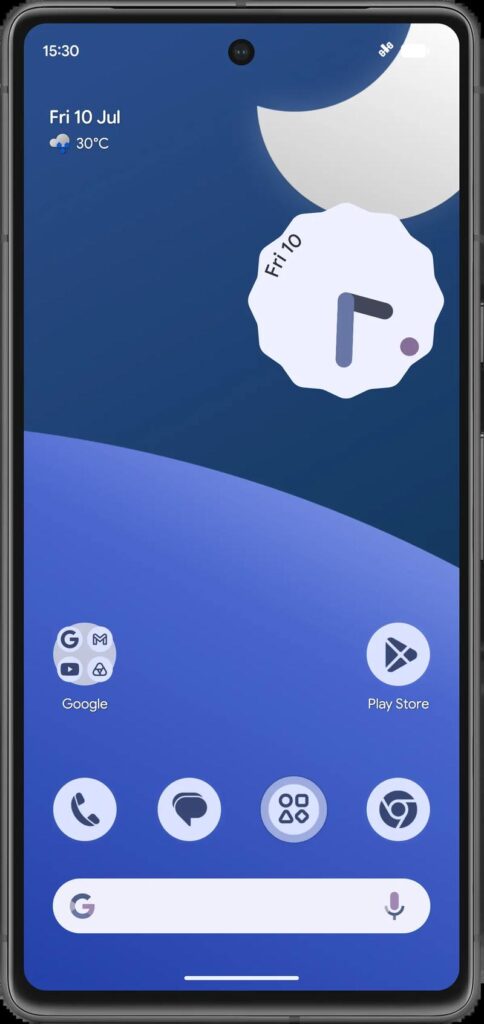
Lawnchair starts from a simple idea: the best Android launcher is the one Google ships on Pixels, but everyone should be able to have it. Under the hood it is built on Launcher3 — the same open-source launcher code that powers the Pixel Launcher — so it does not try to reinvent the home screen. It refines it. The app drawer slides up exactly the way your thumbs expect, widgets sit on a proper responsive grid, and the whole thing feels fast because it is genuinely lightweight: the official APK is just 17 MB, a fraction of the bloated stock launchers that ship on most phones.
Where Lawnchair pulls ahead is customization. Pixel Launcher lets you change almost nothing — wallpaper, grid size, and that is about it. Lawnchair keeps the Pixel look as the default and then hands you the keys: icon packs, adaptive icon shapes, themed icons that tint to match your wallpaper, custom fonts, grid density down to the exact number of rows and columns, dock customization, gesture shortcuts, and a notification-badge system you can tune per app. It is the rare launcher that satisfies both camps — people who want their phone to “just look like a Pixel” and people who spend Sunday afternoons perfecting their home-screen setup.
The other difference is trust. Lawnchair is fully open source under the GPL-3.0 license, developed in the open by a volunteer team with thousands of contributors. The Google Play listing declares no data collected and no data shared with third parties — and because the source code is public, anyone can verify that claim. In a category where several popular launchers have been caught phoning home with usage data or injecting ads into the app drawer, that transparency is not a footnote. It is the whole point.
Key Features Explained
1. Pixel-style home screen on any phone. Lawnchair reproduces the Pixel Launcher experience faithfully: the swipe-up app drawer, the Google search pill, the At-a-Glance widget showing date, weather, and upcoming calendar events. If you have ever handled a Pixel and thought “I wish my phone felt this clean,” this is the closest you can get without switching hardware. And because it is built on Launcher3, it inherits Google’s animation polish rather than imitating it.
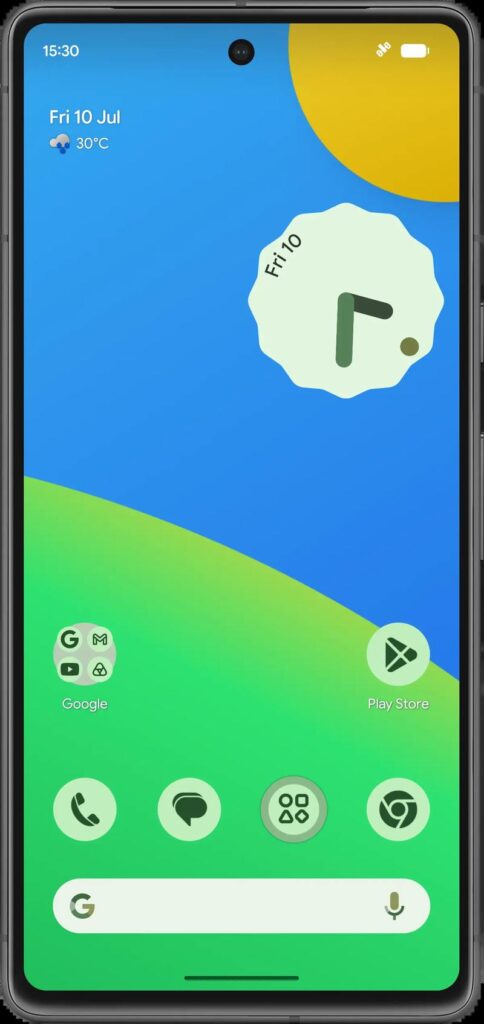
2. Icon packs and themed icons. This is the headline customization feature. Lawnchair supports the thousands of icon packs on the Play Store — including the team’s own Lawnicons project — and applies them with one tap. It also supports Android’s themed icons, which automatically tint your app icons to match your wallpaper colors for a unified Material You look. You can mix and match: themed icons for a clean aesthetic, or a bold icon pack when you want personality.
3. Deep grid and layout control. Stock launchers typically offer two or three grid sizes. Lawnchair lets you set the exact number of rows and columns on the home screen, the app drawer, and the dock independently. Want a dense 6×7 grid that fits everything, or a minimal 4×4 with breathing room? Both take ten seconds. Icon size, label visibility, and widget padding are all adjustable too, so the layout genuinely adapts to your screen size and your taste.
4. Gestures and shortcuts. Double-tap to sleep, swipe down for notifications, swipe up for the app drawer — Lawnchair’s gesture system turns the home screen into a shortcut pad. You can bind gestures to launching apps, toggling the flashlight, locking the screen, or opening quick settings. Power users map their most-used actions to gestures and barely touch the app drawer at all. The screen-lock gesture uses the Device Administrator permission, which is optional and disabled by default — Lawnchair prompts you only if you enable it.
5. At-a-Glance widget with Smartspacer support. The At-a-Glance widget is one of the Pixel Launcher’s signature touches, and Lawnchair includes full support for it — date, weather, calendar events, and commute info in one glanceable strip. Version 15 adds integration with Smartspacer, the community project that extends At-a-Glance with plugins, so you can add now-playing info, flashlight toggles, and more to the same widget.
6. Local on-device search. Swipe up in the app drawer and start typing: Lawnchair searches your installed apps, contacts, and settings locally, on your phone, with nothing sent to a server. It is fast — results appear as you type — and it respects the privacy promise that runs through the whole project. In an era where even keyboard apps want to upload your keystrokes, a launcher that searches without phoning home is worth noting.
7. Nova Launcher backup import. One of the standout additions in Lawnchair 15 Beta 3 is the ability to import Nova Launcher backups — home-screen and dock grid layout, widgets, folders, and your selected icon pack all come across. If you are a long-time Nova user curious about Lawnchair, you no longer have to rebuild your setup from scratch to try it. Given Nova’s uncertain future, this migration path is genuinely useful.
8. No ads, no tracking, no accounts. There is no premium tier to unlock, no “pro” upsell, no account to create, and no analytics SDK quietly reporting your app launches. The project is funded by voluntary donations through Open Collective, which is why the app can afford to be completely free. On a phone where every preinstalled app seems to want your data, a launcher with a public source tree and a clean data-safety declaration is refreshingly boring — in the best way.
Lawnchair vs the Alternatives: An Honest Comparison
Against the stock Pixel Launcher, Lawnchair wins on customization and loses nothing on feel — it is built from the same code. The only real Pixel-exclusive features you miss are a couple of Google’s server-side integrations, which most people never notice.
Against Nova Launcher, the picture is more nuanced. Nova still offers the deepest customization on Android — more gesture options, more drawer styles, more everything. But Nova’s development has slowed dramatically, its new owners have a mixed reputation on privacy, and its future is uncertain. Lawnchair is the safer long-term bet: actively developed, open source, and now with Nova backup import to ease the switch. If you need Nova’s most extreme tweaks, stay; if you want 90% of the customization with a cleaner conscience, move.
Against Niagara Launcher, it comes down to philosophy. Niagara is a brilliant minimalist rethink of the home screen — one scrolling list, no grid. Lawnchair is the opposite bet: the classic home-screen grid, perfected. Choose Niagara if you want to rethink how you use your phone; choose Lawnchair if you love the standard Android home screen and just want it better.
Against Microsoft Launcher and the various OEM launchers, Lawnchair wins on privacy and lightness. Microsoft’s launcher is capable but tied to a Microsoft account and telemetry; OEM launchers are bloated and ad-adjacent. Lawnchair asks for nothing and gives you a faster phone in return.
The honest caveat: Lawnchair 15 is still in beta. The team says so plainly, and you should expect the occasional rough edge — a widget that needs re-adding after an update, a rare stutter in the app drawer. The betas have been stable enough for daily use for most people (this writer included), and the 1.1 million Play installs suggest the community agrees. But if you need absolute, boring reliability today, the older Lawnchair 12/14 builds or a stable alternative remain the conservative choice.
Lawnchair APK Download for Android
Grab the official lawnchair apk download (Lawnchair 15.0.0 Beta 3) below. The button takes you to the official Lawnchair website, where you can download the signed release build directly from the developers — no mirrors, no repackaged files, no bundled junk.
Prefer the Play Store route? Lawnchair is also published on Google Play as Lawnchair by David Sn, where it has passed 1.1 million installs. Note that the Play build installs as a separate app from the GitHub build and some features are restricted to comply with Play policies — the direct APK from the official site is the full, unrestricted build. Advanced users can also track every release automatically with Obtainium, which watches the GitHub releases page and notifies you of updates.
How to Install the APK
- Download the APK. Tap the download button above on your phone. When the file finishes downloading, open it from your notification shade or your file manager’s Downloads folder.
- Allow installs from this source. Android will ask for permission to install apps from your browser or file manager. This is a one-time toggle — enable “Allow from this source” and go back. You are installing the developers’ own signed APK, which you can verify against the checksums published on the official GitHub releases page.
- Set Lawnchair as your default launcher. After installation, open Lawnchair once, then go to Settings > Apps > Default apps > Home app and select Lawnchair. Your old launcher stays installed, so you can switch back anytime. To import a Nova backup, open Lawnchair’s Home settings and follow the import prompt.
Lawnchair APK Download Tips and Tricks
Start with the long-press: almost everything in Lawnchair is configured by long-pressing it — the home screen opens Home settings, an app icon opens its shortcut and notification-dot options, the At-a-Glance widget opens its own preferences. Second, pair Lawnchair with Lawnicons, the team’s companion icon pack, for themed icons that cover thousands of apps instead of the few dozen Android themes by default. Third, if your phone supports it, enable the QuickSwitch Magisk module for buttery recent-apps integration (root required). And finally, back up your layout from Home settings before major updates — beta builds occasionally reset widget placements, and a backup turns a five-minute rebuild into a ten-second restore.
Frequently Asked Questions
Is Lawnchair safe to install?
Yes. Lawnchair is fully open source (GPL-3.0), so its code is publicly auditable, and the Google Play listing declares no data collection and no data sharing with third parties. Download only from the official site (lawnchair.app), the official GitHub releases, or the Play Store listing — never from random APK mirrors, where files can be tampered with.
Does Lawnchair drain battery?
No more than any other launcher — typically less than the bloated stock launchers it replaces. At 17 MB with no background analytics or ad SDKs, Lawnchair is one of the lightest launchers you can install. If you notice drain after switching, it is almost always a misbehaving widget, not the launcher itself.
Will Lawnchair work on my Samsung / Xiaomi / Oppo phone?
Yes, on any phone running Android 8.0 or newer. One caveat: some manufacturers (notably Xiaomi with MIUI/HyperOS and Huawei) aggressively kill background processes and restrict third-party launchers’ gesture navigation. If gestures feel broken, check your phone’s battery-optimization and default-app settings — this is an OEM restriction, not a Lawnchair bug, and the community documents workarounds for each brand.
Can I go back to my old launcher?
Absolutely. Installing Lawnchair does not remove or modify your stock launcher. Go to Settings > Apps > Default apps > Home app and pick your old launcher to switch back instantly. Your Lawnchair layout is preserved, so you can flip between the two while you decide.
Should I use the beta or wait for a stable release?
Lawnchair 15 Beta 3 is what the team currently recommends for regular users, and with over a million installs it is proven as a daily driver. Expect the occasional minor bug — that is what “beta” means — but major breakage is rare. If you are setting up a phone for someone non-technical, consider the older stable Lawnchair 12 builds instead; everyone else can confidently run the beta.
Is Lawnchair really free? What’s the catch?
There is no catch. Lawnchair has no ads, no premium tier, and no paid features — every customization option is available to everyone. The project is run by volunteers and funded through optional donations on Open Collective. That funding model is exactly why it can stay free without selling your data.
Final Verdict
Lawnchair is the rare app that delivers exactly what it promises: the Pixel Launcher experience, opened up, on any Android phone. It is fast, genuinely beautiful, deeply customizable without being overwhelming, and — in a category full of data-hungry alternatives — provably private. The beta label is the only real asterisk, and for most users it is a small one. If your home screen has felt stale, bloated, or just not yours, this lawnchair apk download is the fastest upgrade you can make to your phone today. Install it, set it as default, and spend ten minutes making it yours — you will wonder why you waited.